Printer networking (USB, Wi-Fi, Ethernet, sharing)

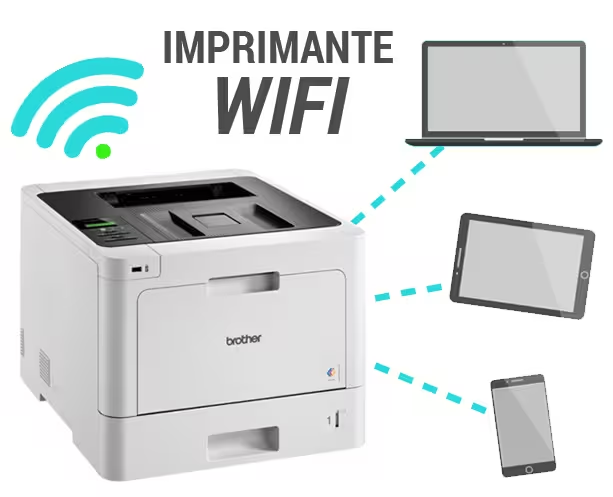
We connect and share your printer with all your devices (PC, Mac, smartphones). Wi-Fi, Ethernet cable or shared USB: we choose the most reliable solution depending on your home and your internet box.
Printer connection and sharing around Saint-Chamassy (Audrix, Le Buisson-de-Cadouin, Limeuil, Coux-et-Bigaroque-Mouzens…).
Installation, sharing and print tests
At home within 24h – Windows, macOS, iOS/Android
  • Printer connection: secure Wi-Fi (WPA2/3), WPS, or Ethernet.
  • Driver installation + scan configuration (USB or network).
  • Multi-computer sharing (Windows/macOS), tests and usage tips.

Common symptoms

  • The printer doesn’t appear on the network or stays offline.
  • Printing works on one PC but not on others.
  • Driver error, AirPrint unavailable, ePrint unreliable.
  • Unstable Wi-Fi, changed internet box, password forgotten.

Tip: note the exact model of the printer and the box to speed up diagnosis.

Our 6-step method

  1. Quick diagnosis: box/SSID, signal quality, printer IP address.
  2. Updates: printer firmware and recommended drivers.
  3. Secure connection: Wi-Fi (password/WPS) or Ethernet cable.
  4. Drivers & utilities: Windows/macOS, enable network scanning.
  5. Multi-computer sharing: network discovery, AirPrint/ePrint, mobile devices.
  6. Final tests & advice: test page, scan to PC/folder, backup settings.

Brand-specific notes

  • Epson : Wi-Fi Direct, WPS sometimes unreliable, Epson Scan 2 utility.
  • HP : HP Smart / ePrint, network discovery, Windows print queue.
  • Canon : AirPrint/Bonjour on macOS, IJ Scan Utility, Windows sharing.
  • Brother : Full network drivers, scan to folder/FTP, ControlCenter utility.

Installation for all brands – Wi-Fi/Ethernet/shared USB.

Eco-friendly & smart

A reliable network setup prevents unnecessary reprints and replacement of printers that still work.

We focus on updates, optimal placement of the box/router, and ink-saving settings.

Wi-Fi, Ethernet or shared USB: which to choose?

The right choice depends on your home’s layout, the number of devices and the desired stability.

Wi-Fi printer

Pros

No cables, flexible placement, smartphone compatible.

Cons

Sensitive to interference, variable speed depending on box and walls.

Ethernet printer

Pros

Very stable, fast, ideal for several PCs or an office.

Cons

Requires a cable or a free port on the box/switch.

Shared USB printer

Pros

Budget solution if the printer has no Wi-Fi.

Cons

Host PC must stay on; scanning sometimes limited.
When possible, choose Ethernet for stability. On Wi-Fi, use a single 2.4/5 GHz SSID, a strong password and, if possible, a fixed IP for the printer.

Frequently Asked Questions

The printer is not detected on the network, what should I do?

Check power and connection (Wi-Fi or cable), restart the box and printer, then print a configuration page. We can set a fixed IP and reinstall the correct drivers.

Wi-Fi is convenient, Ethernet is more stable. In houses with thick walls or for heavy multi-computer use, Ethernet is recommended. Otherwise, Wi-Fi with good box placement and fixed IP.

Yes via a host PC (Windows/macOS) or a small USB print server. Scanning may be limited depending on the model. We install and test the best solution.

Installation, sharing and print tests

When possible, choose Ethernet for stability. On Wi-Fi, use a single 2.4/5 GHz SSID, a strong password and, if possible, a fixed IP for the printer.

Free travel within a 20 km radius, then 10€ + €0.50/km beyond (up to 60 km).

They speak about Tera24

Tera24 - Dépannage Informatique place picture
5.0
Based on 25 reviews
powered by Google
Noëmie C. profile picture
Noëmie C.
2 months ago
Disponible et professionnel, je recommande vivement Damien
leo D. profile picture
leo D.
2 months ago
Malgré la distance (près d'une heure de route), il a toujours été disponible et ponctuel. J'ai beaucoup apprécié les échanges, ainsi que son professionnalisme et sa ténacité : même lorsqu'un PC lui résiste, il ne baisse pas les bras. Une excellente prestation que je recommande sans hésiter. Petit détail pour la prochaine intervention : un logo sur la voiture serait pratique pour le reconnaître plus facilement ! 😅
Jacques J. profile picture
Jacques J.
2 months ago
Accueil parfait ...devis fait rapidement...vous pouvez avoir confiance ....réparation rapide
Peter G. profile picture
Peter G.
3 months ago
Lorsque notre ordinateur portable a refusé de démarrer, Damien a réagi rapidement et a diagnostiqué une panne de notre SSD ! Il nous a permis de reprendre nos activités en moins de 48 heures, grâce à une solution très économique.

Un service excellent, professionnel et convivial. Nous recommandons Tera24 sans hésiter. Merci Damien.
Emmanuelle M. profile picture
Emmanuelle M.
4 months ago
Nous avons contacté Damien de Tera 24 pour la réparation d’un iPhone dont l’écran était hors service. Il a su nous proposer un devis clair, précis et transparent dès le départ. La réparation a été effectuée très rapidement, avec un grand professionnalisme.
Nous avons particulièrement apprécié sa précision, son sens de l’écoute et sa disponibilité. Un service efficace et sérieux que nous recommandons vivement !
Michel. D. profile picture
Michel. D.
5 months ago
Ponctuel, efficace, très sympathique, Damien m'a bien aidé à gérer ma piètre compétance en informatique
Kimberley V. profile picture
Kimberley V.
6 months ago
Super travail! Il a pu récupérer les donnés sur mon disque dur externe que j'avais formaté. Il a aussi fait en sorte que mon ordinateur soit plus rapide en remplaçant mon disque dur interne!! Je recommande ! Diagnostic gratuit!
Philippe D. profile picture
Philippe D.
6 months ago
Je vous le recommande ,il dépanne a domicile et bon travail pour avoir dépanner mon ordinateur qui a plus de dix ans,un grand merci
Regine L. profile picture
Regine L.
6 months ago
J'avais un problème avec mon anti-virus et l'installation de windows 11. J'ai fait intervenir Tera24. Je tiens à remercier Damien pour son intervention rapide et professionnelle. Réparation effectuée avec beaucoup de sérieux, explications claires. Je suis très satisfaite du service et je le recommande vivement. Sans aucune hésitation je ferai à nouveau appel à lui si besoin. Merci à Damien.
Corinne et P. profile picture
Corinne et P.
6 months ago
Très bon dépannage et explications détaillées Intervention très rapide
On doit se revoir dès que j’aurai un moment pour autres aides à transférer d’un vieil ordi à portable.
À bientôt Cordialement