Tech Buying Guides
USB-C Dock and Dual Monitors: Check Compatibility Before You Buy
Video, power, cables and graphics limits: verify the whole chain before buying a USB-C dock for two monitors.

Tech Buying Guides / Practical guide
THE TERA24 JOURNALThe Toolkit I Actually Use Every Day
I'll be straightforward with you: this isn't the cheapest toolkit on the market, nor is it the ultimate repair kit that some bloggers claim everyone absolutely needs. It's simply the one I've been using for several years, on multiple repair jobs every week, and it has never let me down. That distinction matters.
The Tera24 approach
Why I Stopped Using Cheap Repair Toolkits
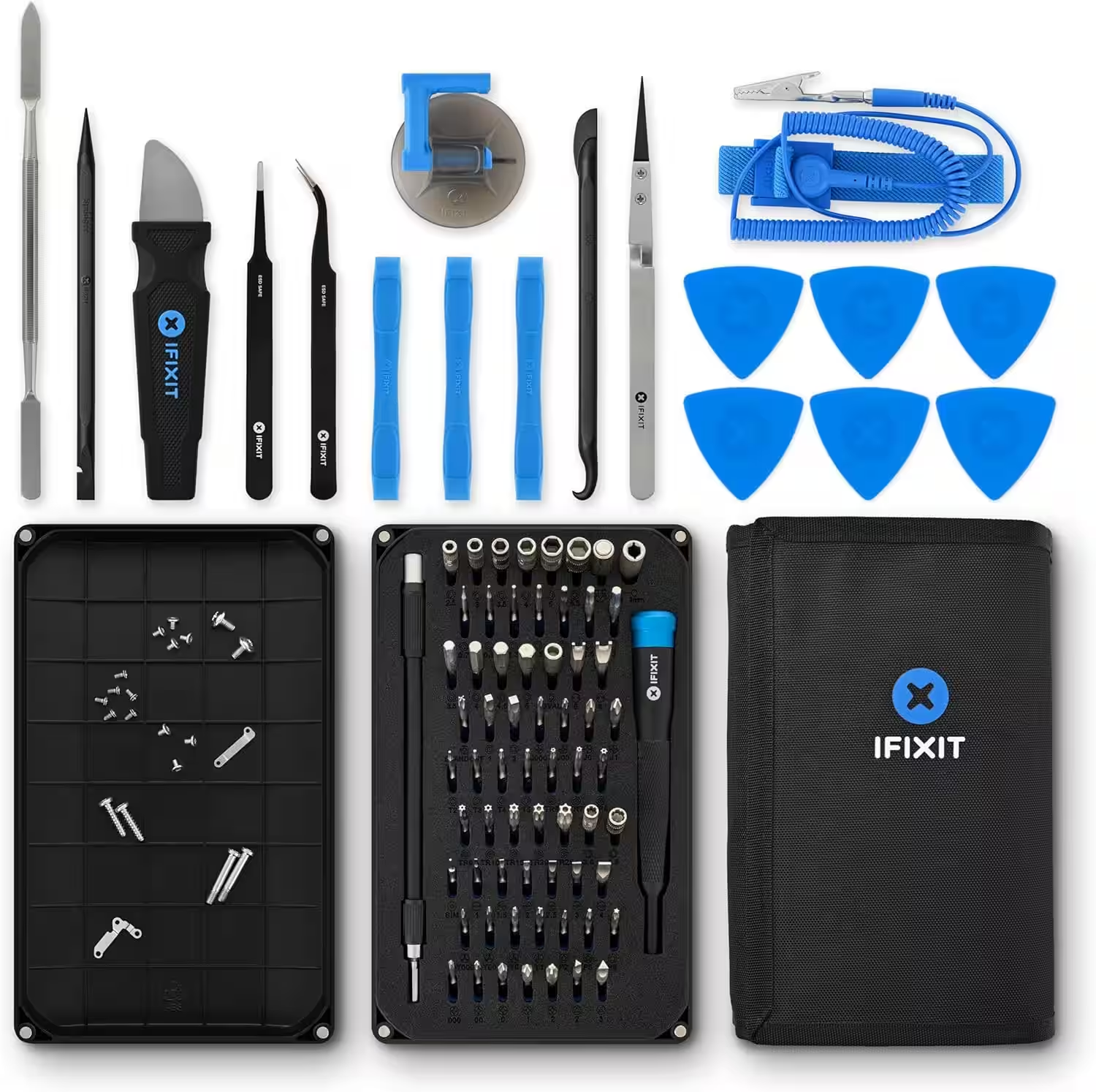
For years, I repaired smartphones and computers using €15 toolkits bought from supermarkets or online marketplaces. They got the job done—most of the time. Then one day, I stripped the Pentalobe screw on an iPhone because the bit kept slipping. The customer wasn't happy, and neither was I. That's when I invested in the iFixit Pro Tech Toolkit—and I've never regretted it since.
When I provide on-site support—whether in Sarlat, Périgueux, or a small village in the Périgord Noir—I often come across the same situation: someone tried to replace their phone screen or install an SSD, only to get stuck because they didn’t have the right tools. A stripped screw, a broken clip, a torn connector… avoidable damage that can turn a 20-minute repair into an irreversible failure.
The good news is that with the right equipment, many common repairs are within reach of a motivated DIY user. The bad news is that not all toolkits are created equal—not even close.
In precision electronics, the margin for error is almost nonexistent. If a screwdriver bit doesn’t fit a screw perfectly, you can strip the head, making it nearly impossible to remove without specialist equipment. If an opening tool is too rigid, you can crack an aluminium chassis.
It’s not about being fussy—it’s about getting the job done properly. And when you’re working on a client’s phone, the result is what matters.
| Criteria | Budget Kit | Mid-Range Kit | iFixit Toolkit |
|---|---|---|---|
| Number of bits | 20–30 | 40–50 | 64 x 4 mm bits |
| Bit precision | Approximate fit | Acceptable | Precision-machined |
| Opening tools (spudgers, picks, etc.) | Missing or unusable | Basic | Complete and high-quality |
| Proprietary bits (Pentalobe, Y000, Gamebit, etc.) | Rare | Partial selection | Yes, all included |
| Anti-static wrist strap | No | Sometimes | Yes |
| Storage | Basic pouch | Varies | Organised tool roll + bit case |
| Estimated lifespan | A few months | 1–2 years | Several years |
| Suitable for professional use? | No | Occasionally | Yes |
Here is exactly what comes in the box, because Amazon listings are often unclear:
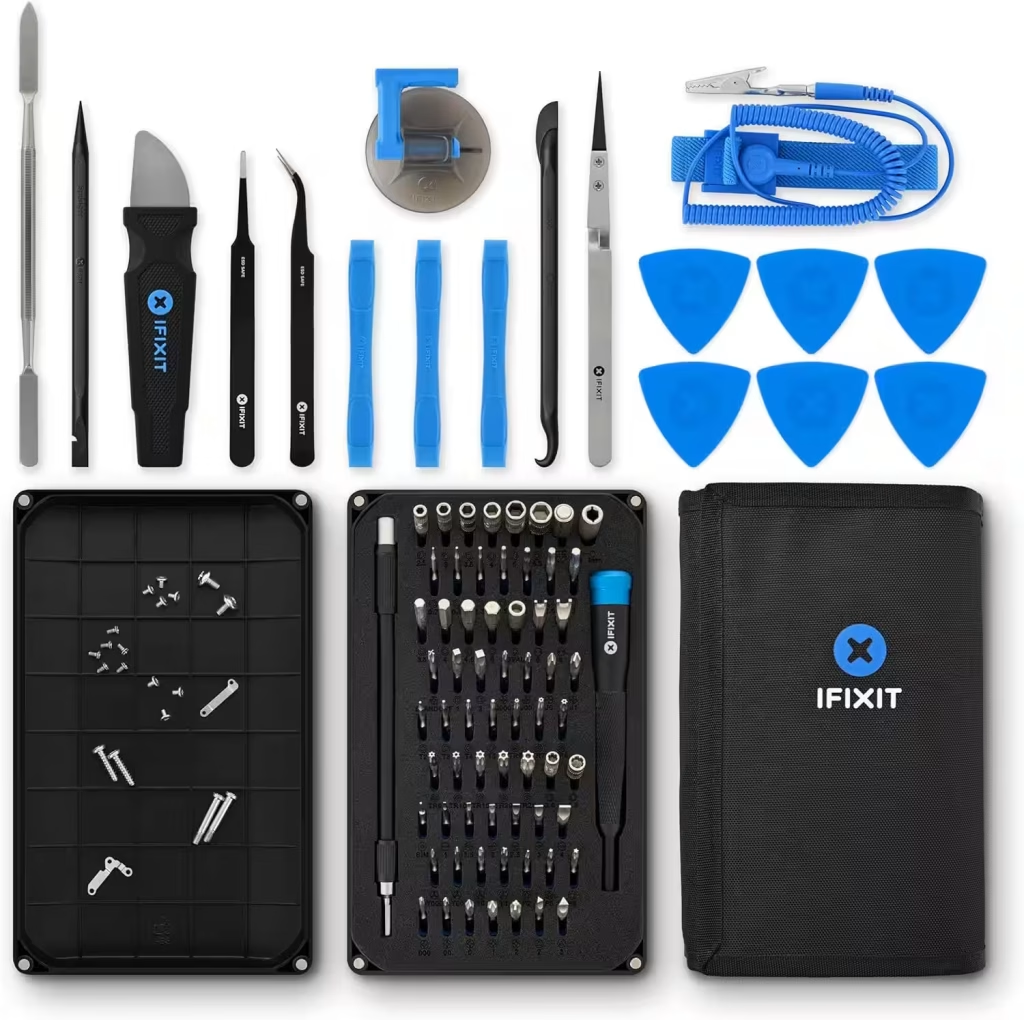
1. Anti-static wrist strap — Helps prevent electrostatic discharge from damaging components. It should always be used when working on motherboards and RAM modules. It is often missing from entry-level kits, even though it should be the first thing you put on before opening a PC.
2. Small suction cup — Used to lift iPhone or Galaxy screens without cracking them. It’s the tool people often try to replace with a bathroom suction cup… only to end up breaking the display.
3. Opening tools ×3 — Rigid plastic picks designed to slide along seams and unclip cases without leaving marks. Essential for devices with glued or tightly fitted front panels.
4. Flexible opening picks ×6 — Thinner picks for devices with adhesive seals, glued batteries, or factory-bonded screens. They are inserted gradually around the casing to avoid pulling the adhesive away all at once.
5. Reverse-action tweezers with nylon tips — Used to handle ribbon cables and position delicate components without creating a short circuit. Nylon does not conduct electricity, unlike standard metal tweezers.
6. Curved anti-static tweezers — Useful for retrieving screws from awkward corners and picking up tiny components that have fallen deep inside the chassis.
7. Blunt-tip anti-static tweezers — The most versatile of the three. This is the one I regularly use to reconnect LCD ribbon cables.
8. Spudger — The tool beginners underestimate most. It is a flat lever made from rigid synthetic material and is used to disconnect ribbon cables—the flat cables linking the screen or camera to the motherboard—without tearing them. On a smartphone, this action may be repeated dozens of times. Use the wrong tool and you can rip a cable and waste a €40 replacement part. The iFixit spudger has the right balance of rigidity: firm enough to provide leverage, but flexible enough not to snap.
9. Halberd Spudger — A variation with a finer, tapered tip for reaching deep connectors or removing adhesive in areas that standard tools cannot access. Particularly useful on MacBooks and iMacs.
10. Metal spudger — For situations where plastic tools are not strong enough, such as hardened adhesive residue or especially stubborn casings. It must be used carefully around electronic components.
11. Jimmy — A thin, rigid pry tool designed to open devices that are strongly bonded or glued together, especially phones with waterproof seals.
12. Flexible extension shaft — Lets you reach screws at difficult angles without dismantling half the device. It is useful on certain laptops where screws sit deep inside the chassis or behind other components.
13. 64 x 4 mm bits — The heart of the toolkit (see the next section).
14. Magnetic screwdriver handle — Solidly built, with a rotating cap for fast turning and precise control in tight spaces. The magnet holds both the bit and the screw during use—a small detail that matters when working above an exposed motherboard.
15. Tool roll — Keeps the entire kit organised and easy to carry to on-site jobs. Every tool has its place, so nothing gets lost.
This is where the kit really stands out from the alternatives. Here is the complete list, exactly as shown on the packaging:
| Type | Available Sizes |
|---|---|
| Phillips | 000, 00, 0, 1, 2 |
| Flathead | 1, 1.5, 2, 2.5, 3, 4 mm |
| Torx | T2, T3, T4, T5 |
| Security Torx | TR6, TR7, TR8, TR9, TR10, TR15, TR20, TR25 |
| Pentalobe | P2, P5, P6 — Apple screws, missing from 90% of generic kits |
| JIS (Japanese Industrial Standard) | J000, J00, J0, J1 |
| Hex | 0.7, 0.9, 1.3, 1.5, 2, 2.5, 3, 3.5, 4, 4.5, 5 mm |
| Tri-point | Y000, Y00, Y0, Y1 — used in Nintendo Switch consoles and some AirPods |
| Nut Drivers | 2.5, 3, 3.5, 4, 5, 5.5 mm |
| Square | 1, 2 |
| Gamebit | 3.8, 4.5 mm — used in retro consoles such as the SNES, Game Boy, and Mega Drive |
| Spanner | 6, 8 |
| Triangle | 2, 3 mm |
| SIM Card Eject Bit | — |
| Oval Bit | — |
| Magnetic Pickup Bit | — |
| iPhone Standoff Screw Bit | — |
| 1/4″ to 4 mm Adapter | — |
Having such a complete range of proprietary bits is what makes the real difference in practice. When I open a Nintendo Switch to replace a drifting Joy-Con, I need a Y000 bit—something you rarely find in generic kits. When replacing an iPhone battery, a Pentalobe bit is essential. These bits are sometimes included in cheap kits, but the tolerances are often too loose: the bit spins inside the screw instead of gripping it properly, and that is when things go wrong.
I am not going to tell you that this is the best toolkit in the world for everyone. That simply would not be true.
What the iFixit Pro Tech Toolkit does well:
What it does not offer:
The real question is this: a €15 toolkit will not last long and will probably be missing the exact bit you need at the worst possible moment. A €40 kit is often still incomplete when it comes to proprietary screws. The iFixit toolkit sits in the range where durability and broad compatibility justify the higher upfront cost over time. It is an investment, not an impulse purchase.
Quality tools have become slightly more expensive since 2024, following the general rise in material costs. The price of the iFixit Pro Tech Toolkit regularly changes on Amazon, so always check the current price using the link below. It can vary from one week to the next depending on promotions.
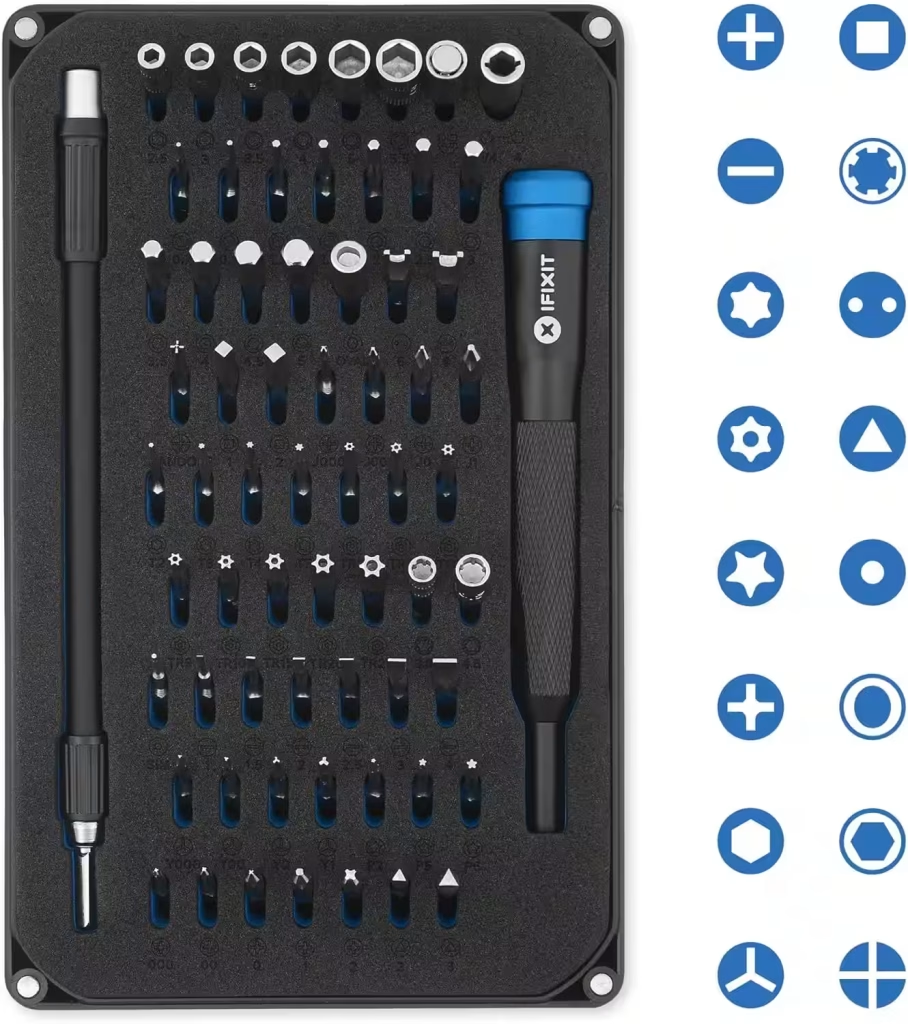
My opinion: It is not the perfect toolkit—there is no such thing. But it is the one I have taken to every job for several years, and so far, it has never let me down. The spudger in particular is exceptionally good for this price range: rigid enough to provide leverage, yet flexible enough to avoid damaging a €30 ribbon cable. That is the kind of detail you can only appreciate in real-world repair situations.
If you buy the Pro Tech Toolkit, the iFixit FixMat is the one accessory I recommend straight away. It is a magnetic work mat with erasable, writable compartments. When dismantling a laptop with 25 different screws spread across eight stages, noting where each screw belongs can prevent a lot of stress during reassembly.
Having the right tools is not always enough. Some repairs require a proper diagnosis first. Replacing a battery when the real problem is a faulty charging circuit, for example, wastes both time and money.
I regularly provide on-site support throughout Dordogne to:
If you have any doubt about the real cause of the problem, ten minutes of diagnosis can save you from an expensive mistake.
The iFixit Pro Tech Toolkit deserves its reputation, provided you understand what you are buying. It is not the cheapest kit, nor is it the ultimate choice for professionals who need laboratory-grade equipment. It is a versatile, durable toolkit with an unmatched selection of proprietary bits in this price range, designed to withstand years of regular use.
If you regularly repair devices, own several electronic devices at home, or are starting a repair business, it is probably one of the best initial investments you can make.
If you only repair one device every couple of years, a more affordable toolkit will probably be enough. You can always upgrade later if your needs change.
And if you would rather leave the repair to someone who uses these tools every day, I am available throughout Dordogne seven days a week, from 7 a.m. to 11 p.m.
Some links in this article are Amazon affiliate links. If you purchase through these links, I may earn a commission at no additional cost to you. This helps support and fund the Tera24 website.
Written by
IT technician and founder of Tera24, I provide computer repair, troubleshooting, and optimization services throughout Dordogne, helping individuals and businesses keep their technology running smoothly.
About Tera24 ↗From guide to workshop
Further reading
Tech Buying Guides
Video, power, cables and graphics limits: verify the whole chain before buying a USB-C dock for two monitors.
Tech Buying Guides
Watts, VA, runtime, outlets and controlled shutdown: choose a UPS for genuinely essential devices without oversizing it.
Tech Buying Guides
Workload, condition, battery, warranties and repairability: practical checks before buying a refurbished computer.