PCs & Computers
Moving to a New Windows PC: A Checklist for Files, Apps and Access
Files, software, licences, email and peripherals: a checklist for verifying a new Windows PC before erasing the old one.

PCs & Computers / Practical guide
THE TERA24 JOURNALA raised enclosure means testing must stop before the cause is confirmed
I explain the credible signs and the handling that must be avoided around a swollen battery.
The Tera24 approach
Arrange safe removal and use the right recycling option
The method depends on the model: never force a trapped battery, and a laptop with an integrated battery may need to be taken intact to an e-waste collection point.
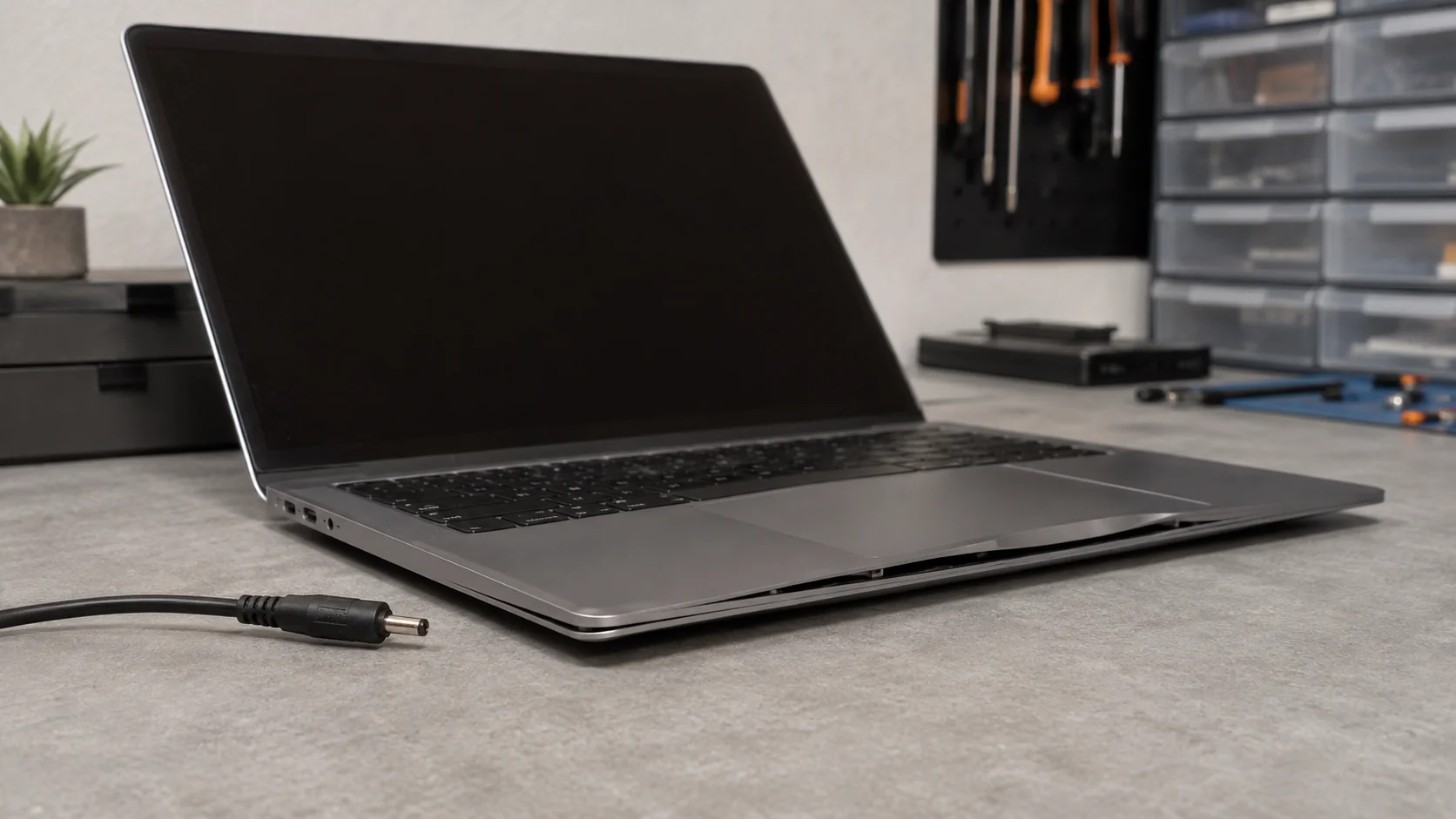
A swollen laptop battery can deform the enclosure and other internal components. A chassis panel that is lifting, or a touchpad that no longer sits correctly, is therefore a credible warning sign. A photograph or a single symptom is not enough for a definitive diagnosis from a distance, however. The laptop needs to be assessed without pressing or forcing the enclosure.
Start by looking at the laptop while it rests on a flat surface, without pressing it. Compare the lines of the enclosure, the touchpad alignment and any visible gaps between panels. The aim is not to open the machine, but to note possible deformation without compressing it. A swollen battery can push against internal parts as well as the outer enclosure.
A raised panel is not enough to confirm remotely that the battery is the only cause. It is still a sufficient reason to stop testing: safety comes before a confirmed diagnosis.
Deformation may affect the visible enclosure as well as internal components. I therefore do not limit the check to the touchpad. Keep the computer powered off, do not press any raised area, and have the complete machine assessed before considering a replacement battery. This approach records the warning sign without turning it into a certain diagnosis.
Do not push the panel back into place or put a heavy object on the computer. Record the exact model and what you can see, then leave it unused. If the original concern was unusual heat, my guide to a computer overheating and shutting down covers that diagnosis, but suspected deformation first requires the battery precautions described here.
Dell advises discontinuing use and disconnecting AC power when swelling is present. Disconnect the charger without twisting or pressing the enclosure. Do not turn the laptop on one last time to save a document or measure battery life: a swollen battery must no longer be used.
Stop even if you only planned to use the laptop briefly. Do not leave it in sleep mode or recharge it to see whether the deformation changes. The next step is not an endurance test, but battery replacement followed by appropriate disposal.
If the computer no longer responds, avoid repeated power tests. The guide to a computer that will not turn on explains general power diagnosis, but those checks must not bypass the safety response required by a visibly deformed battery.
The aim is neither to dramatize the situation nor to imply that unplugging solves it. Disconnecting stops the charge; the swollen battery still needs replacement and appropriate disposal.
The manufacturer’s guidance is explicit: do not crush, drop, mutilate, puncture, expose to high temperature, disassemble, press, bend or force a swollen battery. ADEME also states that a swollen or damaged battery must never be punctured, crushed or handled without care.
Do not use a screwdriver as a lever, pliers or a pointed object to free a battery that is pushing the enclosure apart. Do not heat the case and do not attempt to flatten the battery. Deformation is not a cosmetic defect to correct; it requires stopping use and arranging appropriate handling.
Those prohibitions continue throughout the handling process. Do not press the enclosure while moving the device, disassemble the battery while preparing a replacement, or bend it to save space. I keep the component in its current state until the manufacturer or a qualified service has identified a removal method appropriate to the exact laptop model.
If swelling has trapped the battery, do not try to release it. Dell explicitly warns against forcing a battery that is stuck in this condition.
Do not disassemble the battery itself. Even when the laptop cover looks accessible, removal depends on the model design and the component’s actual condition. The boundary is straightforward: if removal requires pressure, bending, puncturing or force, stop and leave the task to a qualified professional.
There is no universal removal procedure. Some laptop batteries are easily removable, while others are integrated beneath the cover. Swelling can also trap the component. Dell says removal may require the manufacturer, an authorized technician or another qualified service suited to the model.
Record the laptop brand and exact model without turning it on, then consult the manufacturer’s instructions from another device. If the documentation describes an easily removable battery and removal requires neither pressure nor force, a dedicated collection point can accept the separate battery. If the task is difficult, keep the whole device intact.
I prefer to stop an intervention early rather than force an already deformed enclosure. A battery trapped by swelling must not be freed by force. An accessible screw or a generic tutorial does not change that limit: the laptop design and battery condition determine the appropriate method.
The decision therefore comes down to the two situations covered by the recycling guidance. If the battery is genuinely easy to remove for that model and no force is required, it can be handed over at a battery collection point. If it is integrated, difficult to remove or trapped by swelling, keep the complete device intact and take it to an e-waste collection point.
Before choosing between those two options, I check only what the manufacturer specifies for the exact laptop model. A visible cover or a set of screws does not by itself mean that the battery is easy to remove, especially when swelling is already obstructing it.
Do not ask only how to open the laptop. Ask who can remove this exact battery without bending or compressing it, and where the component will be handed over. Removal and end-of-life handling belong in the same plan.
A swollen battery must no longer be used. It needs replacement and appropriate disposal. ADEME specifies that a small battery belongs neither in household waste nor in the packaging recycling bin.
When the battery is easily removable, take it to a battery collection point. When it is integrated and difficult to remove, take the complete device to an e-waste collection point. That distinction prevents a recycling decision from becoming a forced disassembly.
The order matters: do not force removal merely to simplify sorting. Choose the recycling option according to the battery’s actual condition and whether it is genuinely easy to remove or integrated into the laptop.
Before moving it, ask the manufacturer, qualified professional or collection point how to prepare the device for drop-off. I do not improvise packaging, shipping or long-term storage. The responsible approach is to stop use, protect the component from pressure, arrange suitable removal where possible and then use the appropriate collection point.
Battery replacement makes sense only when the rest of the laptop justifies repair, but that economic decision follows the safety response. A remote diagnosis cannot guarantee the condition of components that may already have been deformed.
Written by
IT technician and founder of Tera24, I provide computer repair, troubleshooting, and optimization services throughout Dordogne, helping individuals and businesses keep their technology running smoothly.
About Tera24 ↗From guide to workshop
Further reading
PCs & Computers
Files, software, licences, email and peripherals: a checklist for verifying a new Windows PC before erasing the old one.
PCs & Computers
A non-destructive test to restore files, inspect their contents, record errors and fix your backup before a real incident.
PCs & Computers
Inventory, scheduling, retention, a separate copy and restore tests: organise usable NAS backups for several small-business computers.